This document describes VibeCody’s security model, data privacy practices, and hardening recommendations for production deployments.
Security Model Overview
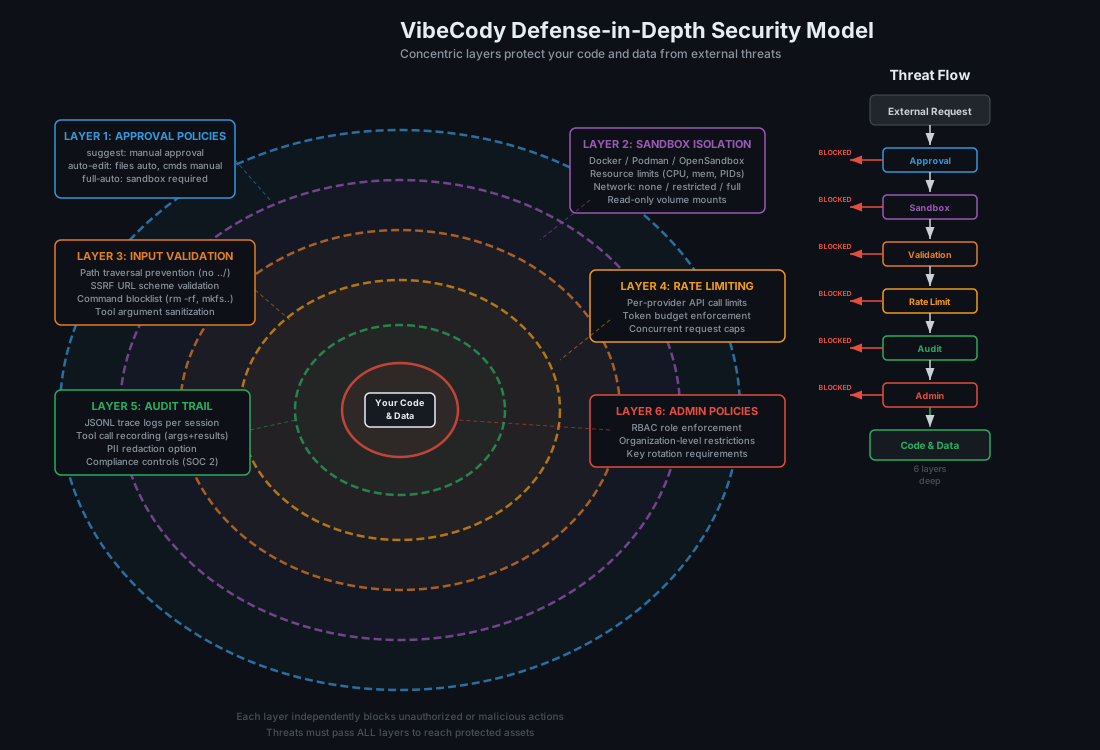
VibeCody follows a defense-in-depth approach with multiple independent layers of protection:
- Approval policies gate what the agent can do.
- Sandbox isolation restricts where agent commands execute.
- Input validation prevents path traversal and SSRF attacks.
- Rate limiting protects against abuse.
- Audit trails record every action for review.
- Admin policies enforce organizational restrictions.
No single layer is relied upon in isolation. A failure in one layer is contained by the others.
Data Privacy
VibeCody itself does not collect telemetry, analytics, or usage data. What leaves your machine depends entirely on your provider configuration:
| Configuration | Data Sent Externally |
|---|---|
| Ollama (local) | None. All inference runs on your hardware. |
| Cloud provider (Claude, OpenAI, Gemini, etc.) | Prompt text and code context are sent to the provider’s API. |
| OpenRouter | Prompt text is sent to OpenRouter, which routes to the selected model provider. |
| Air-gapped Docker | None. The container has no network access. |
When using cloud providers, review their data retention policies. Most major providers (Anthropic, OpenAI, Google) offer API usage with no training on your data, but terms vary by provider and plan.
Recommendations:
- For sensitive codebases, use Ollama or an air-gapped deployment.
- Use
api_key_helperor the encrypted ProfileStore for API keys. Never hardcode them in config files. .vibecli/config.tomlshould contain no secrets at all, so committing it is safe;profile_settings.dbandworkspace.dbnever belong in version control.
Approval Policies
Approval policies are the primary mechanism for controlling agent autonomy:
suggest (default)
The agent proposes every action and waits for explicit user approval before proceeding. This is the safest mode and is recommended when working with unfamiliar codebases or untrusted prompts.
auto-edit
The agent can read and write files automatically but must request approval before executing shell commands. This balances productivity with safety for routine coding tasks.
full-auto
The agent can perform all actions — file edits, command execution, tool invocations — without approval. Use only with sandbox enabled. This mode is designed for CI pipelines and batch processing where human interaction is not available.
[agent]
approval_policy = "suggest"  # "suggest", "auto-edit", or "full-auto"
Sandbox Isolation
VibeCody has two separate sandbox subsystems. This page documents the opt-in container sandbox. It is not the same thing as the always-on Tier-0 native sandbox.
Container sandbox (this page) Tier-0 native sandbox Enabled opt-in via [sandbox] enabled = truealways on for daemon-mediated tool calls Isolation full container namespace per-OS process isolation Requires Docker, Podman, or OpenSandbox nothing ( bwrapon Linux for filesystem isolation)Documented in this page sandbox.md Tier-0 applies whether or not you enable the container sandbox, and its coverage is uneven by platform — macOS gets network isolation only. Read sandbox.md before relying on either.
The container sandbox executes agent commands inside a container, preventing access to the host system.
Container Runtimes
VibeCody supports three container runtimes through the unified ContainerRuntime trait:
- Docker — Most common. Requires Docker Engine or Docker Desktop.
- Podman — Rootless alternative to Docker. No daemon required.
- OpenSandbox — Lightweight isolation for environments without Docker.
Configuration
[sandbox]
enabled = true
runtime = "docker"           # "docker", "podman", or "opensandbox"
image = "ubuntu:22.04"       # Base image for the sandbox
allow_network = false        # Block all outbound network access
mount_workspace = true       # Mount the current project directory (read-write)
allowed_tools = ["read", "write", "bash", "search"]
timeout_secs = 300           # Kill the container after this duration
Network Controls
When allow_network = false, the container is started with --network=none, preventing all inbound and outbound connections. This is critical for air-gapped deployments and prevents the agent from exfiltrating data or downloading malicious payloads.
API Key Management
Storage Options
Never put an API key in
config.toml,.env, or any other plaintext file. Earlier revisions of this page listed the config file as a supported option. It is not one — the encrypted stores replaced it, and any key still sitting in a config file should be moved and then rotated.
API keys can be provided through three mechanisms, listed from most secure to least:
-
api_key_helper — a command that returns the key on stdout, so VibeCody persists nothing at all. Integrates with system keychains, Vault, or AWS Secrets Manager:
[provider] api_key_helper = "security find-generic-password -s vibecody-anthropic -w" -
Encrypted stores — the default persistent path, and where
vibecli set-keyand the VibeCoder Settings → Keys tab write:Store Path Scope ProfileStore ~/.vibecli/profile_settings.dbaccount-level keys WorkspaceStore <workspace>/.vibecli/workspace.dbproject secrets Both use ChaCha20-Poly1305 (AEAD) with a random 12-byte nonce prepended per record (
crates/vibe-profile-store/src/lib.rs). The ProfileStore is machine-bound by design — do not commit it.vibecli set-key anthropic sk-ant-... -
Environment variables — a compatibility fallback for CI and containers. Readable by any process in the same environment and visible in process listings on some platforms, so prefer one of the two options above on a workstation:
export ANTHROPIC_API_KEY="sk-ant-..."
Key Rotation
When rotating API keys:
- Generate a new key from your provider’s dashboard.
- Update the environment variable or key helper.
- Verify with
vibecli doctorto confirm the new key works. - Revoke the old key from the provider’s dashboard.
Connector & MCP Server Credentials
A connector is an MCP server the workspace can talk to — GitHub, GitLab, a database, Google Calendar, or one from the connector marketplace in VibeDesk’s Integrations view. Each one is a real subprocess (or, for a remote MCP server, a proxy process) that runs with whatever credential it needs to do its job. That credential is not a config value; it is a capability, and it is scoped accordingly:
- Stored encrypted, never in the connector’s own definition. A
connector’s
env_keyslist records which environment variable names it needs — never the values. The values live in the sameWorkspaceStore(<workspace>/.vibecli/workspace.db, ChaCha20-Poly1305) that holds provider API keys, under a key derived from the connector’s own id (connectors::secret_key(connector_id, env)). Reading, exporting, or logging the connector list — which the marketplace UI does routinely — never exposes a secret value, because the definition never carries one. - Injected only into that connector’s own process, at launch, nowhere
else.
resolve_mcp_configsbuilds oneMcpServerConfigper enabled connector and sets its environment from that connector’s own secrets only. A Gmail connector’s OAuth client secret is never visible to the Calendar connector’s process, the agent’s own environment, or any other connector — each subprocess sees exactly the variables it declared and nothing belonging to a sibling. - Removing a connector removes its secrets with it, not just its definition row — deleting the connector and forgetting its credential are the same action, not two.
- Some connectors need no VibeCody-stored secret at all. The Google
Calendar connector proxies through
mcp-remote, which speaks OAuth 2.1 + PKCE itself: the browser-granted token is cached bymcp-remotein its own local state (~/.mcp-auth), not by VibeCody. Clearing that directory revokes VibeCody’s access without touching any VibeCody store. - What this does not yet cover. A connector process is not
independently sandboxed from the rest of the machine the way a
full-auto agent run is (see Sandbox Isolation above) — it runs with
whatever filesystem/network access its own runtime (
npx,uvx) has. Treat a connector’s trust boundary as “as trusted as any other local process you’d run with that credential,” not as contained the way a container-isolated agent task is.
SSRF Prevention
Both the CLI tool executor and the VibeCoder agent executor validate all URLs before making HTTP requests. The validate_url_for_ssrf() function enforces:
Allowed schemes: http:// and https:// only. All others (file://, ftp://, gopher://, etc.) are rejected.
Blocked destinations:
- Loopback addresses:
127.0.0.1,localhost,::1,0.0.0.0 - Cloud metadata endpoints:
169.254.169.254,metadata.google.internal - RFC 1918 private ranges:
10.x.x.x,172.16-31.x.x,192.168.x.x - Link-local addresses:
169.254.x.x
This protection is enforced in three locations:
tool_executor.rs— CLI agent’sfetch_urltoolagent_executor.rs— VibeCoder agent’sfetch_urltoolcommands.rs—fetch_and_strip()used by context pickers and chat
Path Traversal Prevention
All file operations performed by the agent go through path validation that:
- Canonicalizes paths via
std::fs::canonicalize()to resolve symlinks and..components. - Validates workspace boundary — the resolved path must start with the workspace root.
- Blocks absolute paths outside the workspace (e.g.,
/etc/passwd,~/.ssh/). - Handles non-existent files — for new file creation, the parent directory is canonicalized.
- Normalizes path separators to prevent bypass via mixed separators on Windows.
Both executor implementations (tool_executor.rs for CLI, agent_executor.rs for VibeCoder) enforce these checks.
Command Execution Security
Shell commands executed by the agent (via the bash tool or AI-generated <build>/<run> tags) are subject to multiple layers of protection:
Command Blocklist
The following patterns are blocked before execution:
| Category | Blocked Patterns |
|---|---|
| Destructive | rm -rf /, mkfs, dd if=, shred, > /dev/sd |
| System control | poweroff, reboot, halt, shutdown |
| Fork bombs | :(){ :|:& };: |
| Exfiltration | curl -d, wget --post-data, /dev/tcp/ |
| Encoded execution | base64 -d \| sh, base64 -d \| bash |
| Reverse shells | nc -e, ncat -e |
| Persistence | crontab |
| Firewall | iptables, ufw |
| Permissions | chmod -R 777 / |
Execution Timeout
All agent bash commands have a wall-clock timeout:
- CLI executor: Configurable, default unlimited (sandbox provides isolation)
- VibeCoder executor: 120 seconds (hard limit, process killed on expiry)
- Project scripts: 300 seconds (5 minutes)
AI Response Command Filtering
Commands extracted from LLM responses (<build command="..."> and <run command="..."> tags) pass through the same blocklist before execution. This prevents prompt injection attacks where a malicious LLM response attempts to execute dangerous commands.
SQLite Command Injection Prevention
The database panel blocks SQLite dot-commands that could execute system commands:
.shell,.system,.import,.load,.output,.once,.log.open,.save,.backup,.restore,.cloneATTACH DATABASE(prevents accessing arbitrary files)
Rate Limiting
The HTTP daemon (vibecli serve) enforces per-endpoint rate limits:
| Endpoint | Default Limit |
|---|---|
/api/chat |
60 requests/minute |
/api/agent |
20 requests/minute |
/api/tools/* |
120 requests/minute |
/health |
Unlimited |
Rate limits are configurable in the serve configuration. Exceeding the limit returns HTTP 429 with a Retry-After header.
[serve]
rate_limit_chat = 60
rate_limit_agent = 20
Admin Policy
Organizations can enforce restrictions through a policy file at .vibecli/policy.toml in the project root or a global policy at ~/.vibecli/policy.toml:
[policy]
# Restrict which providers can be used
allowed_providers = ["claude", "ollama"]

# Block specific shell commands
blocked_commands = ["rm -rf /", "curl", "wget", "nc"]

# Require sandbox for full-auto mode
require_sandbox_for_auto = true

# Disable specific tools
disabled_tools = ["bash"]

# Maximum context tokens per session
max_context_tokens = 200000
Policy files are read at startup and cannot be overridden by user configuration.
Audit Trail
Every agent action is recorded in JSONL trace files:
~/.vibecli/traces/
  session-abc123.jsonl          # Tool calls, model requests, timing
  session-abc123-messages.json  # Full message history
  session-abc123-context.json   # Context window snapshots
Each trace entry includes:
- Timestamp (ISO 8601)
- Action type (tool_call, model_request, model_response, user_input)
- Input and output data
- Duration in milliseconds
- Token usage (prompt and completion)
Traces can be reviewed in the VibeCoder Traces panel or exported for external analysis. The compliance controls module supports configurable retention policies and automatic PII redaction.
Compliance Readiness Reports
The Compliance panel in VibeCoder and vibecli --compliance report score the
project you have open against a control framework by scanning it. The scan is
evidence-based: it walks the workspace, records the file and line that
demonstrates each control, and reports everything else as a gap.
This is a gap assessment, not an audit report. An attestation comes from an independent licensed CPA. A SOC 2 Type II in particular is evidence that controls operated consistently over a three-to-twelve-month observation window; a scan of a source tree is a point-in-time look at control design, and only at the part of that design which is visible in code. Use these reports to find gaps before a readiness assessment, not to satisfy one.
vibecli --compliance report --framework soc2                 # scan the working directory
vibecli --compliance report --framework gdpr --path ~/code/app
vibecli --compliance report --framework iso27001 --format json --output report.json
Frameworks: soc2, fedramp (NIST 800-53 subset), hipaa, gdpr, iso27001.
How a control is scored
Each control names the signals that would evidence it — a CI pipeline, a lockfile, TLS configuration, an audit log, a documented runbook. The scanner looks for them in file paths and file contents:
| Result | Meaning |
|---|---|
| Implemented | Every required signal was found, with the files cited as evidence. |
| Partial | Some required signals were found; the notes name what is missing. |
| Gap | No supporting evidence was found, or a finding blocks the control. |
| Not assessed | The control cannot be evidenced by a repository at all. |
Findings — a credential file tracked in git, a credential literal in source — cap the controls they touch at Gap, whatever else was found.
What the score does and does not say
The percentage is computed over scored controls only. Personnel screening,
vendor contracts and physical access leave no trace in a repository, so those
controls are reported as Not assessed and excluded from the denominator
rather than counted as passes. If nothing could be scored the report says
n/a, never 0%.
Every report carries the scope of its own scan — the directory, the number of files seen and read, whether a scan budget was reached, and whether the directory was a git checkout (the committed-credential checks are skipped when it is not). A truncated scan and a clean project produce the same absent evidence, so the report always says which one it was.
A passing report is a starting point for an audit, not an audit result: the scanner sees that TLS is configured somewhere in the tree, not that every endpoint uses it.
Filing a report
Every report records its own provenance — the tool version, the commit scanned, and whether that tree was dirty. A report taken over uncommitted changes cannot be reproduced from its commit, so it says so rather than letting a filed copy imply otherwise; off a git checkout the commit is reported as unknown rather than invented.
# One framework, filed with its provenance inside it.
vibecli --compliance report --framework soc2 --output soc2.md
vibecli --compliance report --framework soc2 --format json --output soc2.json
Filing every framework at once
--all scores the project against every supported framework and writes the set
to a directory. It is one scan: the walk is the expensive half of a report
and each framework asks the same questions of it, so all five reports describe
the same tree at the same instant and carry the same scope and timestamp. Five
separate invocations would not — a tree that changes between them produces five
reports that cannot be compared.
vibecli --compliance report --all --output-dir ./compliance-2026-08
vibecli --compliance report --all --format both --output-dir ./compliance-2026-08
vibecli --compliance report --all --path ~/code/app --output-dir ./out
--format takes markdown (default), json, or both. --output-dir also
works with a single --framework; --all requires it, since there is no single
file to write and nothing to checksum on stdout.
The directory holds one report per framework per format, plus two index files:
| File | Contents |
|---|---|
<framework>.md / <framework>.json |
The report, e.g. soc2.md, iso27001.json |
manifest.json |
Tool version, scan timestamp, the shared scan scope, and one entry per report: file name, byte length, SHA-256, controls scored, and the score (null, never 0, when nothing could be scored) |
SHA256SUMS |
The same digests in the format shasum -a 256 -c reads |
cd compliance-2026-08 && shasum -a 256 -c SHA256SUMS
The checksums establish that a filed copy is byte-identical to what the scan produced. They are not signatures: anyone who can edit a report can recompute its digest and rewrite the manifest. To bind a bundle to an identity, sign the directory with your own tooling — the checksums make that a single-file job.
Air-Gapped Mode
For environments with no internet access:
Setup
- Pre-pull the required Docker images and Ollama models on a connected machine.
- Transfer them to the air-gapped host via
docker save/docker loadandollama cp. - Use
docker-compose.ymlto run VibeCLI with the Ollama sidecar:
docker-compose up
Verification
Confirm no network egress:
# Inside the container
curl https://example.com  # Should fail: network is disabled
The Docker Compose configuration sets network_mode: none for the VibeCLI container and creates an internal-only network between VibeCLI and Ollama.
Reporting Vulnerabilities
If you discover a security vulnerability in VibeCody, please report it responsibly:
- Do not open a public GitHub issue for security vulnerabilities.
- Email security@vibecody.dev with:
- A description of the vulnerability.
- Steps to reproduce.
- Potential impact assessment.
- You will receive an acknowledgment within 48 hours.
- We aim to release a fix within 7 days for critical issues.
We appreciate responsible disclosure and will credit reporters (with permission) in the release notes.
Security Hardening Checklist
Use this checklist when deploying VibeCody in production or sensitive environments:
- Set approval policy to
suggestorauto-edit(notfull-autowithout sandbox). - Enable sandbox with
allow_network = false. - Use
api_key_helper, orvibecli set-keyto write into the encrypted ProfileStore. - Confirm no API key remains in
~/.vibecli/config.tomlor any.envfile — and rotate any key that was ever stored there. - Keep
~/.vibecli/profile_settings.dbout of version control (it is machine-bound). - Configure an admin policy file with
allowed_providersandblocked_commands. - Review trace logs regularly for unexpected agent behavior.
- Set
max_context_tokensto limit memory usage per session. - Enable rate limiting on the HTTP daemon if exposed to a network.
- Keep VibeCody updated to receive security patches.
- For air-gapped deployments, verify network isolation with connectivity tests.
- Enable PII redaction in compliance controls if handling sensitive data.
- Configure data retention policies to automatically purge old traces.
- Run
vibecli doctorperiodically to verify configuration integrity.